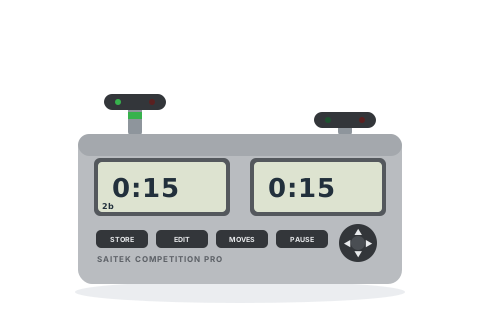
Saitek left the chess business years ago, but these still turn up in league matches every week.
Before you start
Slide the switch on the underside to GO (the further positions turn off the sound, the lights, or both).
Pick a mode with the round pad: ◀ / ▶ choose the mode family, ▼ steps through its presets. The current code — 2a, 3b and so on — shows at the bottom left.
Press the plunger on your side to start your opponent's clock. The green light shows whose clock is running.
Set the popular time controls
Pick the control you are playing and follow the steps — nothing here needs the manual.
5+0
Blitz — 5 minutes each
The first preset in Blitz mode — the club-night classic on this clock.
Mode 2a
Press ▶ until Blitz mode shows — 2a (5 minutes) is its first preset.
Press a plunger to start.
Each player has 5 minutes.
15+0
Rapid — 15 minutes each
A built-in preset.
Mode 2b
Go to Blitz mode and press ▼ once, to 2b.
Press a plunger to start.
Each player has 15 minutes.
25+0
Rapidplay — 25 minutes each
A built-in preset.
Mode 2c
Go to Blitz mode and press ▼ twice, to 2c.
Press a plunger to start.
Each player has 25 minutes.
3+2
Blitz — 3 minutes + 2 seconds a move
The first Fischer preset.
Mode 4a
Press ▶ to Fischer mode — 4a is 3 minutes + 2 seconds.
Press a plunger to start.
3 minutes each, with 2 seconds added when your clock starts.
15+10
Rapid — 15 minutes + 10 seconds a move
No preset — edit a Fischer mode.
Mode 4a, edited
Select Mode 4a and press EDIT — the first digit flashes.
Set the main time to 0:15 (▲ / ▼ change the digit, ◀ / ▶ move along), then continue ▶ to the per-move bonus screen and set 0.10.
Press EDIT to finish — or press STORE, pick memory 7A, and press STORE again to keep it.
Press a plunger to start.
15 minutes each plus 10 seconds a move — and memory 7A recalls it from Mode 7 any time.
Handicap
Different times for each player
Odds games — the two sides can differ in every mode except tournament.
Any Blitz or Fischer mode + {EDIT}
Select a mode and press EDIT.
The cursor walks both displays: set the left player's time, keep pressing ▶, and set the right player's differently.
Press EDIT to finish, then a plunger to start.
Each side has its own time.
Tips and troubleshooting
Know its famous quirk: when a flag falls the clock stops completely (except in Game mode), so the second flag can never fall — and in multi-period settings a flag falling exactly on the quota move can fail to register. Prefer its single-period modes, and treat the first flag as the end of the game.
Hold PAUSE/RESET for 3 seconds to leave a game and get back to mode selection.
Hold MOVES during play to see the move count — the clock keeps running.
Your three stored settings (7A–7C) live under Mode 7 — but removing the batteries for more than a few seconds wipes them.
The underside MODIFY / LOCK switch decides whether times can be edited mid-game — league arbiters set LOCK.
The plungers beep at different pitches — low for the right, higher for the left — so you can hear whose press it was.