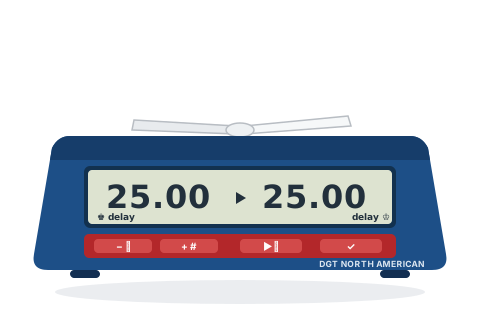
The original is discontinued; a 2024 "Upgraded Version" is current in the US market. The steps below are from the original's manual.
Before you start
Slide the recessed ON/OFF switch on the underside. The last-used option number shows.
Choose an option with + / − (the full list is printed on the base), then press ✓ to activate it.
Whenever a digit blinks, change it with + / − and press ✓ to accept it and move on.
Put the lever up on White's side — the king symbols show the colours — and press ▶⏸ to start.
Set the popular time controls
Pick the control you are playing and follow the steps — nothing here needs the manual.
G/25 d5
Quick — 25 minutes with 5-second delay
The classic USCF quick control, as a one-press preset.
Option 18
Choose Option 18 and press ✓.
Lever up on White's side, then press ▶⏸.
25 minutes each; the clock waits 5 seconds before counting down on every move.
5+0
Blitz — 5 minutes each
Straight five-minute blitz.
Option 01
Choose Option 01 and press ✓.
Lever up on White's side, then press ▶⏸.
Each player has 5 minutes.
G/5 d2
Blitz — 5 minutes with 2-second delay
USCF blitz with delay.
Option 17
Choose Option 17 and press ✓.
Lever up on White's side, then press ▶⏸.
5 minutes each with a 2-second delay before each countdown.
3+2
Blitz — 3 minutes + 2 seconds a move
Online-style increment blitz.
Option 13
Choose Option 13 and press ✓.
Lever up on White's side, then press ▶⏸.
3 minutes each, plus 2 seconds after every move.
15+10
Rapid — 15 minutes + 10 seconds a move
The standard FIDE rapid control, via the manual Fischer option.
Option 14
Choose Option 14 and press ✓.
Set each player's time to 0:15 (then .00 seconds), digit by digit.
Set the bonus to 0.10 per player.
Lever up on White's side, then press ▶⏸.
15 minutes each plus 10 seconds a move. The clock remembers what you keyed in.
Custom
Any plain time — including different times each player
Odds games and controls without a preset.
Option 02
Choose Option 02 and press ✓.
Set the left player's time digit by digit, then the right player's — they can differ.
Lever up on White's side, then press ▶⏸.
Exactly the times you set, nothing added. Option 20 does the same with a delay; option 14 with an increment.
Tips and troubleshooting
Sound is off by default on every option — press − while the clock is stopped to turn beeps on.
In delay options there is no blinking flag in the final period — that is USCF rules, not a fault; the arbiter reads who flagged from which side reached zero first.
In increment options the clock freezes both sides at the first flag-fall, per FIDE rules.
Pause with a quick press of ▶⏸ — but note that *holding* it starts time-correction mode. If digits start blinking, press ✓ through them and resume.
Press + during play to see the move number; press ✓ to see which option is running.
The full option list is printed on the underside of the clock.