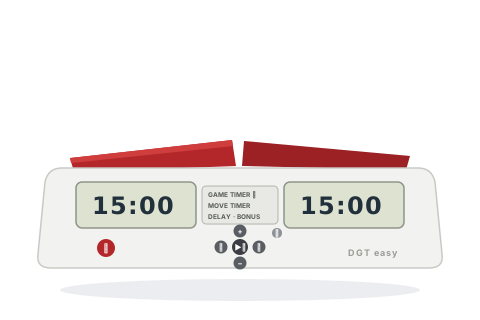
Out of production but common second-hand. The plain Easy has no increment; the Easy Plus adds delay and bonus modes.
Before you start
Press ⏻ — both players' times appear inside a blinking frame.
Set both times together with + / − (hold to speed up).
Step with ◂ / ▸ to move the blinking frame — to one player's time alone, or to the mode panel in the centre.
Press ▶⏸ to start. The player whose paddle end is up is the one to move.
Set the popular time controls
Pick the control you are playing and follow the steps — nothing here needs the manual.
Any time
A straight game — 5, 10, 15 or 25 minutes each
The everyday casual game, on either model.
Game timer mode
With the frame blinking around both times, press + / − until the time you want shows.
Press ▶⏸ to start.
Both players get exactly that time, nothing added.
Handicap
Different times for each player
Odds games — set either side alone.
Game timer mode
Step with ◂ / ▸ until only one player's frame blinks.
Set that side with + / −, then step to the other side and set it too.
Press ▶⏸ to start.
Each side has its own time.
15+10
Rapid — 15 minutes + 10 seconds a move (Easy Plus only)
The standard rapid control — the plain Easy cannot do this one.
Game timer + bonus
Step with ◂ / ▸ to the centre mode panel and choose Game timer + bonus with + / −.
Step to the small extra-time digits and set 0:10.
Step back to the times and set 15:00 for both players.
Press ▶⏸ to start.
15 minutes each, plus 10 seconds added at every paddle press. Use the same flow with other numbers for 3+2, 10+5 or 25+10.
Delay
Delay games (Easy Plus only)
US-style delay — the clock waits before counting down each move.
Game timer + delay
Choose Game timer + delay on the centre panel.
Set the extra-time digits to the delay — for example 0:05.
Set both players' main times and press ▶⏸.
Each move, the countdown waits that many seconds before starting.
Tips and troubleshooting
Press ⏻ briefly for a new game with the same settings; hold it for a second to switch off.
You can pause with ▶⏸ and correct any value mid-game — but note that editing an hours:minutes time quietly zeroes its hidden seconds.
In plain game-timer mode the first player to run out gets a flag and their clock counts up; in delay and bonus modes the flag shows and nothing counts up.
The ♪ button toggles the beeps at any time — it warns during the last five seconds of a game.
Times over 20 minutes display as hours:minutes only; under 20 minutes the seconds appear too.
Move timer mode (centre panel) gives a fixed time per move instead — handy for casual training games.