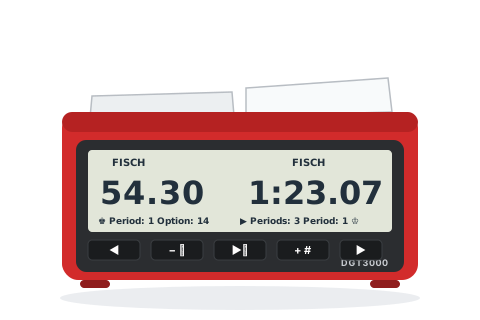
The Limited Edition is the same clock in a wood-effect case — everything below applies to both.
Before you start
Press the ON/OFF button on the underside. Press it twice to reset after a game.
Choose an option number with + / −, then press ▶ to select it.
Whenever a digit blinks, change it with + / − and press ▶ to accept it and move on.
When the pause symbol shows, put the lever up on White's side and press ▶⏸ to start.
Set the popular time controls
Pick the control you are playing and follow the steps — nothing here needs the manual.
15+10
Rapid — 15 minutes + 10 seconds a move
No preset on this clock — but set it once in a custom slot and it is saved for good.
Options 26–30 (custom slots)
Choose a custom slot — say Option 26 — and press ▶.
The timing method blinks: choose FISCH with + / − and press ▶.
Set the first period time to 0:15.00 digit by digit, left side then right.
Set the bonus to 0.10.
Leave Moves at 000, choose END as the next method, and accept the freeze and sound settings.
Lever up on White's side, then press ▶⏸.
15 minutes each plus 10 seconds a move — and option 26 now does this permanently, surviving even a battery change.
5+0
Blitz — 5 minutes each
Traditional five-minute blitz.
Option 01
Choose Option 01 and press ▶.
Lever up on White's side, then press ▶⏸.
Each player has 5 minutes for all their moves.
3+2
Blitz — 3 minutes + 2 seconds a move
Online-style blitz, as a preset.
Option 10
Choose Option 10 and press ▶.
Lever up on White's side, then press ▶⏸.
3 minutes each, plus 2 seconds after every move.
25+10
Rapidplay — 25 minutes + 10 seconds a move
The usual ECF rapidplay congress control.
Option 11
Choose Option 11 and press ▶.
Lever up on White's side, then press ▶⏸.
25 minutes each, plus 10 seconds after every move.
90+30
Classical — 90 minutes + 30 seconds a move
The standard long-play control.
Option 12
Choose Option 12 and press ▶.
Lever up on White's side, then press ▶⏸.
An hour and a half each, plus 30 seconds after every move.
Custom
Anything else — including different times each player
Odds games, multi-period controls, delay — the custom slots do it all.
Options 26–30
Choose a free slot (26–30) and press ▶.
Pick the method: TIME (plain), FISCH (increment), DELAY, BRONST or BYO.
Set the left player's time, then the right — they do not have to match.
Choose END as the next method (or add more periods), then accept freeze and sound.
Lever up on White's side, then press ▶⏸.
Exactly the control you keyed in, saved in that slot permanently.
Tips and troubleshooting
The five custom slots (26–30) keep their settings even with the batteries out — set your club's controls once and they are two presses every week after.
Pause with ▶⏸; hold it 3 seconds while paused to correct times and move counts.
Hold − for 3 seconds to toggle the beeps — this works even during play.
Hold ▶ for 3 seconds before starting to toggle freeze-on-flag (❄).
The display always shows seconds, and names the timing method above each player's time — glance at it to check the clock is in the mode you think it is.
If someone moved the lever while the clock was paused, it enters correction mode on restart as a safety measure — just confirm the times with ▶.